Friday, June 17, 2016

Performance Tuning: Oracle and SQL Server

In the past few weeks, I was able to attend an Oracle Performance Optimization training put on by my organization.  The training was performed by Gaja Vaidyanatha(@dbperfman).  Now Gaja was a very cogent and informative trainer.  The reason for this post though, is that i finally had the more formal training in the Oracle side to compare to the SQL Server side.  In around 2010 or so, i went to a week long Performance Tuning and Optimization class put on by Microsoft.  That was conducted by Josh Vickery (https://www.linkedin.com/in/joshvickery) also a blazingly smart guy.

What’s common between Oracle and SQL Server Performance Tuning?

Well hopefully without coming across as a hanger onner, what’s common is how obvious in hindsight the general concepts are.   Theory of constraints and basic analysis and scientific method rule the day.  Of course the tools vary, but the basic approach is the same.  Gather data on where your database operations are spending most of their time, determine the largest blocker.  Optimize that, then re-measure.  Lather, rinse, repeat.  So both formal instructions were not necessarily new frameworks of thinking for someone who’s had analytical tasks before.  But like most training, there are tricks of the trade and good mindsets shared

Hints, connection settings, session settings

Both platforms have a framework of database session hints, connection settings, sessions settings.  Most of which you should avoid.  While the Einsteins (ref: Lhotka) may point out that you can get such and such a performance increase or less code, etc.  They come at great cost.  #1 the difficulty the next person is going to have figuring out what the heck you were trying to do.  #2 entropy: the characteristics of the database will change and/or product upgrades will obviate the need for the custom configuration or actually make it so its harmful.  Every time I hear about such thing, i think, what are the odds that I can outthink the engineers who designed either of these database platforms. 

I will concede one point that was made.  That if the hint or setting provides information that wasn’t previously available to the database platform.  e.g. cardinality on a temporary table which can’t be known at design time.

It’s the application, stupid!

Other than obvious database perf issues, it’s usually going to be application design issues that drive performance.  Either the application is querying too much data for what it needs, querying the same data repetivily, having long-running applications on the user thread.  While databases will continue to evolve and can be made to perform better and better for cheaper and cheaper, the application design owns the user experience.

What’s different between Oracle and SQL Server Performance Tuning?

Some will read that question and say ‘everything’.  I’m going to be contrarian and say at the high level, not much.  The steps and tools are obviously different.  But you still view an execution plan for a given query (either estimated or actual), or use a profiler tool to analyze waits

Tooling

The tooling for Oracle is a lot less mature than SQL Server.  Maybe not a lot less, but much less accessible.  In SQL Server, through the Management Studio (SSMS), for a query, you can view the estimated execution plan (before actually running the query) or the actual execution plan (after running the query).  In Oracle, the provided tools – SQL Developer does have a way to the view the estimated plan.  To view the actual plan, one has to set a session variable to ‘trace’, browse to the file system of the server (!), copy down a binary file, pass it to an executable called TKProf, then view the output as a text file.  I will say although the SQL Server Management Studio’s graphical view of the execution plan is easier to navigate, the outline view of the execution plan on the Oracle side does have its charms.

In fairness, you might consider Oracle’s tracing/TK prof workflow more similar to SQL Server Profiler and now Extended Events as it includes wait stats and things of this nature.  So then you’re back to this being somewhat limited to sysadmins vs. developers. 

But to the point of it being less accessible, graning permission to n number of developers to access the file system of a database server is odd or possibly untenable.  Luckily for the class I was in, one of our very sharp Oracle DBAs came up with a workaround to expose the default OS trace file location of one of our test servers over HTTP using a simple web server.  Otherwise, the 3 day class would have been spent looking at PowerPoint.  It would seem that third-party tools such as TOAD would provide this capability, but was unable to confirm that with some regular TOAD users

  SQL Server Oracle
Estimated Execution Plan Click the ‘Display Estimated Execution Plan’ button in the toolbar
image
Click the Explain Plan button in the toolbar
image

https://markhoxey.wordpress.com/2012/07/10/obtaining-an-execution-plan/
Actual Execution Plan Click the ‘Include Actual Execution Plan’ button in the toolbar
image
Execute the SQL commands to setup a trace file for yourself
alter session set tracefile_identifier='MyTrace';

Turn on tracing

alter session set sql_trace=true;
alter session set events '10046 trace name context forever, level 12' ;

Execute your SQL

Turn-off tracing

alter session set events '10046 trace name context off';
alter session set sql_trace=false;

?Find the file on your servers files system

Copy to your hard drive

Run the command TKPROF input.trc output.txt

image

So while the steps and individual commands are different, the concepts of Performance Tuning and Optimization in both the SQL Server and Oracle platform are very similar.  If you can find third party tools or open source tools to get around the rough edges of Oracle’s trace file access, developers should find their optimization skills translate well across products.

Thursday, June 16, 2016

Database Architect - what does it all mean?

It's interesting to have such varied work and challenges in front of me in my work for the California Department of Corrections and Rehabilitation (CDCR).  My title is Database Architect, which could mean a lot of things and often does.  I looked back at the week and just noted the variation of tasks, in topic, depth, level of hands-on involvement, hard vs. soft skills, everything.  Blessed to get to work with and around really talented and hard-working people that keep the machine going.

Some of my week looked like:

Received training on Oracle Performance tuning
Conducted training on SQL Server Integration Services, including helping someone get the brand new version SQL Server Data Tools installed.
Helping a group migrate data and customize into a SharePoint list
Trained on SQL Server Reporting Services Report Builder
Helped a developer troubleshoot Web Services over a proxy
Various network architecture plans and database questions

And luckily, since many people take vacation in summer:

Covering for our Infrastructure Architect, helping (mostly just facilitating) the build of CDCR's Inmate Network.

Covering for a database administrator, i've planned and will be performing the organization's first Database backup based on differentials with staged recovery (long way of saying what was expected to take >15 hours should be completed in <5 p="">
Planning portions of a vendor's data center move


Saturday, February 13, 2016

Data Warehouse models–comparing Kimball to Inmon

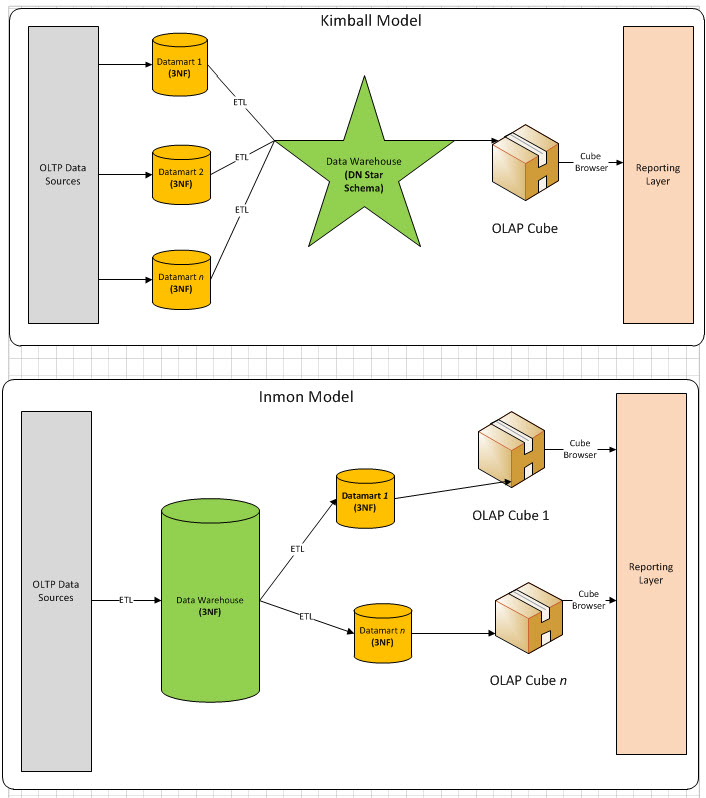
Have recently seen various folks whiteboarding approaches to data warehouse (enterprise data, data stores, ods, etc.) One thing I’m noticing is that they generally fit one or both of the historically accepted approaches, those proffered by Ralph Kimball (and group) and from the writings of Bill Inmon. 

Here’s a comparison diagram I have referenced many times over the years.  The diagram, and article, is from 2010, but the original thought dates back to the 1990’s or earlier.

https://bennyaustin.files.wordpress.com/2010/05/kimball-vs-inmon4.jpg

https://bennyaustin.wordpress.com/2010/05/02/kimball-and-inmon-dw-models/

Take them for what they’re worth and for the era they come from.  Inmon’s model contains what looks like the current buzzword of ‘data lake’ (though Gartner and others are skeptical of the approach)  In all practicality, the only OLAP cubes developed today against a star schema layer.   Agile tools like PowerPivot and Tableau bypass this somewhat, but still contain a step where one models groupings (i.e. dims) and aggregate (i.e. facts)

Sunday, January 31, 2016

Prep notes for my upcoming talk on 'Partially Contained Databases'

Did a prep session this past Friday  for my upcoming talk (Feb. 3) on 'Partially Contained Databases' to the Sacramento SQL Server Users Group (@SacSQLUG)  (Some #spoileralerts if any the group is reading this before the Feb meeting)  Had a few great, gracious current or former co-workers view the talk and demo over a remote screen sharing session and provide feedback. 

  1. The feedback from a group of people with differing experiences with SQL Server was hugely valuable.  As a presenter, you are so close to the topic, you can include things as obvious that you forgot actually took you quite a few leaps to discover yourself.
  2. The call to action, which I will add to the slides, is to 'try it out'.  Try using partial containment for a simple example like a reporting service account that should have access to only one database.
  3. This topic is fast becoming a standard practice to employ for high availability/disaster recovery scenarios.  (At this time, I'll leave it to the viewer's great mental ability to make the connection) 

Some of the core feedback (which may only make sense when the final presentation is shared)
  •  hard time following the difference between types of accounts
  •  too much time spent on the 'intro'; that is the demonstration of backup/restore in an uncontained database to demo the problem trying to be solved
  • appreciated mention of the connection to certification exams
  •  pre-requisites of DBA knowledge 
My thought process incorporating this feedback:
  • Simplified the login and user creation in the demo.  Namely, removed the example using Windows authentication
  • Removed a time-consuming section on various permutations of recovering logins where the password is known/not known, original server is available/unavailable.   This content is saved for a future blog post.
  • Pre-requisites: well, I think it's OK to make an assumption or two since the talk is aimed to the SQL Server user group.  And in any case, that ship has sailed for this week's talk.  I may review the abstract  for future use and make sure it calls out the viewer is familiar with database backup/restore. 
Hurts my heart a bit to give up the Windows auth and login recovery content, because the content is a good practice.  But the time they eat up distracts from the two key  takeaways:

  1. With a partially contained database, logins can live with the schema of a user database rather than the system database (that's a clue for the High Availability/Disaster Recovery connection)
  2. The db_owner and other database roles have additional power within a user database.
Fun stuff.  and i think if i just script out the sample database creation step, all the scripts could be published to let others run the demo themselves.

Friday, January 29, 2016

Musings on Data Warehouse projects- dealing with data sources of varying quality

Had a discussion this past week with some great colleagues re: the quality of the database design of a potential source system (or lack thereof, depending on point of view)  I've racked my brain trying to find an article that provided some caution in dealing with this.  Almost sure it came from either a book or article from the Kimball Group.   I will paraphrase it:

From time to time, a data source will appear to warrant improvement of some kind.  The data source provider may be all for it.  Couldn't that spreadsheet be turned into a proper system?  
Avoid such efforts.  Your team will be constantly distracted by work of a very different cadence than that which data warehousing requires.

The closest I could find was a snippet in “The Microsoft Data Warehouse Toolkit”, from the chapter on Business Requirements Example: Adventure Works Cycles  (emphasis mine)

"….price lists and international support are important issues to his organization, but they are transaction system problems because they involve enhancing transaction systems or building new IT infrastructure. You can help with better reporting, but you shouldn't be dealing with connectivity and data capture issues if you can avoid it. "

I have taken this viewpoint into many battles over scope of a data warehouse project…  I have not won all of those battles ;)  Nonetheless, it’s a positive outcome to have this caution incorporated into your mindset when evaluating sources.  When possible move the system development 'out' to the proper parties as quickly as possible.


Wednesday, October 28, 2015

Oracle's SQL Developer (11gR2) Date display issue

Oracle’s SQL Developer (as shipped with 11gR2) has a bug feature that by default, causes only the date portion of datetime columns to show in the displayed query results.


Here’s the default

And here it is set to the ISO 8601-style date
YYYY-MM-DD HH24:MI:SS

Good luck!


Friday, June 19, 2015

Generate a Remote Desktop Connection Manager config file from SQL Server Central Management Server

If you are a SQL Server database administrator (DBA) who also has need to administer servers via Remote Desktop, this script will be of tremendous help to you at least once, and may be something you run regularly.

This script will query your SQL Server Central Management Server (not using it yet? - check out Easily Manage your SQL Server with CMS and PBM Webcast) and generate the contents of a a config file for Microsoft's Remote Desktop Connection Manager.  All free tools or built into your SQL Servers.

Get the script at:

Prerequisites:
Install Remote Desktop Connection Manager (RDCMan) version 2.7 from https://www.microsoft.com/en-us/download/details.aspx?id=44989
Have populated a SQL Server Central Management Server (CMS) with at least one group and server

To use, run the script against the instance holding your CMS data.
Click on the link to the XML.  Select All and Copy:
Create a new text file with the extension *.rdg (for example MyCMSServers.rdg)  Paste the XML content:
 
In Remote Desktop Connection Manager, File->Open the *.rdg file

Details:
All unique host names are placed under a group called '_All Servers'.  The 'Smart Lists' dynamically filter based on the groups in your SQL CMS.  This is done by placing a comment in the RDCMan node for each server.  

The script doesn't yet generate hierarchical groups in RDCMan.  Keep an eye out for edge cases that I haven't tested yet: special characters in the server or group names, hosts that are found in more than one group, etc.

Get the script at:

Hope you enjoy!

Wednesday, May 28, 2014

An approach to SQL Server Rough Tuning

Looking for a way to address SQL Server database performance in a production, virtualized environment?  There are many sources of expert advice from very smart people in the SQL Server world.  But often the most well-thought, well-intentioned advice is not easily or quickly implemented in a complex organization.  The reasons could be technical, political or simply availability of time and people. 

This diagram is my current approach to "rough" tuning a SQL Server: The idea that a server administrator or database administrator (DBA) can turn various knobs and flip switches to assigned scarce resources to a database server, but as a practical matter, the inner workings of a given application and database may not be changed… or at least not changed quickly. 


Example situations:
  • A third party vendor application with a proprietary schema, the application might have updates, but there are dependencies or license costs that take time.
  • An internal application has received an influx of new activity, but the development team is fully off on another high-priority project
  • A legacy application with original developers long gone; no known test environment to experiment


Method
Took some best practices, including some selections from the guidance on the SQL Server perfmon counters of interest poster available from Dell/Quest, and added some of the basic steps available to Server administrators and Database Administrators.

Document available as a PDF

Monday, March 24, 2014

SQL Server Data Tools - An Installation Adventure

With SQL Server 2012, your old friend "Business Intelligence Developer Studio" or "BIDS" has been replaced by a component called "SQL Server Data Tools".  SQL Server Data Tools, or SSDT is the primary authoring environment for SQL Server Integration Services (SSIS), SQL Server Analysis Services (SSAS), and SQL Server Reporting Services (SSRS) projects.  In addition, a new way of working with SQL Server Databases is available.  The new method treats a SQL Server database as a Visual Studio project, enabling adaption of developer concepts like version control and deployment.  

While SSDT is a very innovative product, the steps to arrive at a working installation of SSDT can be a bit of an adventure.  If you have installed SQL Server 2012 from installation media, selecting all features, or at least selected all client tools, your adventure begins here.  

An entry for SQL Server Data Tools will appear in your Start menu, under the folder for "Microsoft SQL Server 2012"


Click on SQL Server Data Tools and you will soon see that the "Microsoft Visual Studio 2010 Shell" is starting up.

You will be promoted to select environment settings.  If you used SQL Server 200X's Business Intelligence Developer Studio or plan to focus this machine on SQL Server Business Intelligence projects, select "Business Intelligence Settings".  Click 'Start Visual Studio'.

After a potentially brief pause, and this loading screen...

… and you are brought into the 'Microsoft Visual Studio 2010 Shell"

Click on New Project…

Now you can actually create SSAS, SSIS, or SSRS projects at this point.  You are good to go as far as that feature is concerned.  Then check out the new option "SQL Server"…

Note the text "Provides instructions for installing Microsoft SQL Server Data Tools from the web".  Clicking this link presents this message...

Clicking "Install" opens this web page...

If you click on 'Download SQL Server Data Tools', as of the time of this writing, you're taken to a page about downloading Visual Studio 2013 trial editions.  I went this route on another machine with Visual Studio 2013 installed, so far, haven't quite figured out how to get SSDT enabled, so...

Click back…
And click SSDT Visual Studio 2012

On the next page, scroll about halfway down to step 2 and click 'Download SQL Server Data Tools for Visual Studio 2012'

For a single installation, go ahead and click 'Run'.  (To save the file for use on other workstations, click 'Save')

Then thoroughly read the License Terms, and if they are amenable, click 'I agree…' and 'Install'
The Microsoft .NET Framework 4.5.  Your environment may vary.
Restart is required if the .NET Framework 4.5 is installed

After the restart, Setup will continue

After this, the SQL Server Data project will be available under 'SQL Server Data Tools', right?  No, to access the SQL Server tools, they're under 'Microsoft Visual Studio 2012'

The 'SQL' menu  with the 'Schema Compare' and 'Data Compare' are now available.

The SQL Server Data Tools look very compelling.  As I'm help my organization migrate to SQL Server 2012, the new features will replace some work that currently requires manual processes or intricate scripting.  Perhaps the install story will tighten up as SQL Server 2014 is released or the Visual Studio 2013 version becomes a bit more clear to me  It is a bit of an adventure to install - nothing difficult, just unclear at some steps the progress towards a working installation.  Hopefully, this blog post helps you be more confident when you decide to start using SQL Server Data Tools.

Friday, March 21, 2014

IT Project Staffing for Emerging and Legacy applications


I've been catching up in the past week or on the Oregon Health Exchange ("Covered Oregon") issues.  This apparently started popping off in November 2013.  There was a recent spate of articles on GovTech regarding the oversight.

The Cover Oregon Website Implementation Assessment by First Data contained an interesting nugget in their recommendations regarding IT Project Staffing:

IT Project Staffing - The exchange project was a large, complex IT project. Complex IT projects introduce an innate resource risk that can only be mitigated through careful staff planning. First Data recommends the State reconsider how IT projects are staffed in the State. The exchange project filled many of its staffing needs using temporary positions, which are difficult to fill due to their lack of employment security. Additionally, qualified staff hired into temporary positions are likely to continue to search for alternate permanent state positions. Consequently, the exchange project regularly struggled to sustain the anticipated project team size and skills. As a result, a large number of staff members were acquired through contracts. Where possible, introducing temporary positions or consultant positions to an organization to backfill or support the systems that will be replaced would naturally align staff attrition with the technology and application lifecycles. Reserving the permanent or long-term positions for the ‘go-forward’ technologies will also provide the state with the capability to develop stronger, more cohesive IT support teams. 

The opposite tact is common, historically, of course.  The emerging project is established with temporary positions or consultants.  Existing, permanent staff remain with the legacy application.  This very commonly leads to a brain drain as soon as it becomes clear the emerging project will be the new normal.  Absent extraordinary efforts to retain those experienced staff - pay, working environment, chances for new projects - they will simply start searching for other employment.

First Data's recommendation is the opposite.  Place the temporary positions with the legacy system immediately, where it will naturally tail down.  If the legacy system is needed longer, extending a temporary position is relatively easy, the person in that position may be relieved not to have to start a job search soon.  The experienced staff immediately start adding value to the emerging system based on the familiarity with the organization and working environment.

Tuesday, February 18, 2014

A five-year Resume (2008-2013) reviewed

A five year resume is a visionary exercise in career planning: Visualize the type of professional you would like to be in five year and write the resume for that person; The education, the skills, the type of positions and projects that person would have on their resume.  Suffice to say, compare and contrast with the Five year Plan… presumably a plan starting from today forward 5 years.  The five-year resume shows the forward 5 years, allowing you to create a plan to get there.


http://www.careers-advice-online.com/five-year-career-development-plan.html

http://jme.sagepub.com/content/31/1/128.abstract


In 2008, I wrote a five-year resume - the time period ending in 2013.   This post will grade (those not interested in my navel gazing can stop here, but I'm committed to publishing this to hold myself accountable)  My memory and documentation of the process are incomplete, but roughly speaking,  to find material for a five year resume , I identified senior leaders in my organization or that I had met through various professional groups.  I may have included some biographies of leaders in the business space that I read through periodicals such as Information Week or GovTech.  I viewed their resumes, articles, and LinkedIn profiles.  Through that, I assembled some of the projects or positions I would need to pursue to have similar experience.  I listed the education that overlapped my interest with my model's education.  From all that, boiled it down to things that could reasonably be accomplished within 5 years.


Objective


Results-oriented technical project manager with hands on ability in application development and reporting and experience leading technical teams seeking to take on a large enterprise project

Comments: Basically have done all of those, have the ability to do so on an ongoing basis, and am continuing to do so; What's next?


Education

Further Training        

      Related Courses        

Project Management - Advanced

ITIL/ITSM, etc        MBA-level


Comment: Partial: Earned the PMP in 2008 and am into my second cycle maintaining the credential; have spent next to no time on ITIL or ITSM; Not sure what I was getting at about MBA-level, but didn't

Skills

Organizational

Project management professional

Certified in ITSM/ITIL technical management processes

Participating in and leading groups to accomplish project goals

Comment: Basically accomplished; but for the aforementioned ITSM or ITIL; Earned PMP and lead many project groups

Communication

Assess client needs in information systems and offering appropriate solutions

Proactively offering solutions and training to customers of varied skill levels

Delivered training to classes

Published technical author – blog – magazine articles – etc.

Comment: Have pretty muchreached these goals.  I now commonly work with clients at various skill levels and authority; Very often I am the technical lead responsible for proposing a solution vs. just working against a requirements.  Most of my class room training has been ad hoc or small group; Publishing is the one I'm wobbling on.  I am decently active on my blog and social media, but I think I envisioned publishing articles to industry publications or sites

Technical

Microsoft Certified IT Professional; Microsoft Solutions Framework

Architectures – n-tier, web-based

Platforms – Business Intelligence platforms. Microsoft (.Net, COM, DCOM, SQL Server); Oracle, PHP/mySQL

Comment: Pretty much a slam dunk on these; Achieved and MCTS (the evolution of MCITP), could probably do more; Am comfortable with the architectures and platforms I listed, and even ones I couldn't have envisioned 5 years ago

Work Experience

Consultant        Non-profit, etc. small firm        1/2009 –

•        Board-level consulting on IT strategy, etc.

•        Web or application design or selection

•        Fund-raising, etc


Comment: Going to generously give myself a complete on this one; For at least, 3 groups my children are involved in, I have at times been the primary web or technology person; In 2008, I probably envisioned spending more time with professional groups or consulting for other non-profits, however the opportunity to help groups that my sons and other children enjoy so much has been very rewarding

Project Manager        Medium to large organization        1/2009 –

•        Lead Business Intelligence adoption, ideally organization-wide

•        End user component

•        Technical project team, and hand-off to operations project team

Comment: I can see I hedged my organization with the term 'medium to large organization'.  Ended up staying with one large organization - the California Dept. of Corrections - the entire time, starting my 10th year with the organization now.  But moving around within the organization has given me a chance to get these kind of opportunities.  For this experience, really completed this in the past year as I moved to a new position - database architect - but was deeply involved in handing off the old position - business intelligence to some new team members.

Project Manager - 2        Medium to large organization        1/2009 –

•        Manage full-blown, department or large unit-wide project from near initation to completion

•        Apply PMBOK best practices

•        Cross functional teams

Project Manager - 1        Medium to large organization        1/2009 –

•        Manage full-blown, department or large unit-wide project from near initation to completion

•        Apply PMBOK best practices

•        Cross functional teams

Comment: I envisioned managing at least 2 big projects, and although I didn't change organization, I probably ended up managing at least 4-5 in this manner for a single unit - COMPSTAT - of the Dept. of Corrections.  Didn't hold the working title of 'Project Manager' at most points, but nonetheless, was doing PMBOK in an appropriately tailored way; Nearly every project involved some type of cross-functional team; usually a mix of technologists and business program areas

Technical Author        Publishing House        1/2009 –

•        Author technical articles – blog- article - book

•        Companion teaching, courses, speaking

Comments: Had much higher hopes here; early on I had submitted articles to a few IT trade magazines such as MSDN or Code; nothing accepted; Of course the world changed at the same time, with much more emphasis on community and open articles; so my blog and other social media represents at least some effort;  Have arranged many workshops and presentations internal to the organization, not nearly enough public stuff


Next steps:

From this exercise, I would say I didn't end up exactly at plan, but it was a good check on a yearly basis or so to see if there were any big areas . I probably could've set more stretched goals, or documented in more detail the types of project which I wanted to undertake. Ultimately, very happy with where I've landed along this journey.


Well, clearly the next step is to research and start a new five year resume, to set a target for 2019!  Rough ideas include a new game plan for publishing and speaking.  As my commitments to my sons' youth groups change shape as they age, I hope to spend more time in professional groups or perhaps find another non-profit in my community to assist.  The next level of leaders I hope to emulate are hyper-involved in networking, their community, and the development of the staff around them.  Education is always necessary, and I'll need to define a focus to the menagerie of online courses, webcasts, and videos that are available more than ever before, but competing for time with other activities.


This has been my experience with a five-year resume.  I hope that if you've constructed one or are in the process, in what you see here, it will guide your to creating something that you can review at the end of the five year duration and measure yourself, identify next steps… and celebrate what you've accomplished.


Tuesday, February 11, 2014

Tortoise SVN - Update Failed! - Adapting an SSIS development approach for Window Server 2008

Trained some new developers on a SQL Server BI solution that required them to edit various source files - including SQL Server Integration Services (SSIS) packages.  Well immediate after the orientation to the Version Control repository a new developer received an error attempting to update the local repository.


Turned out a couple of assumptions or constraints were in play
1.       Development of SQL Server Integration Services packages is easier from a server console.  The connection rules aren't an issue.  The connection to source systems is usually - not always - but usually faster.  Running a long-running package doesn't interfere with the developer's ability to do other programs on their laptop… or close it up and go home while the long-running process churns on.
2.       Using TortoiseSVN to edit-merge-commit from a remote repository running on a file server was a simple and elegant version control approach.
3.       Having the source code on a shared folder on the server's local file system was convenient
4.       When there were two developers and a Server running Windows Server 2003, this generally wasn't a problem - we weren’t stepping on each other's folders and/or 2003 security was fairly lenient.

After migrating this technique to Windows Server 2008, these error became apparent quickly.
1.       It was still convenient to develop SSIS packages from the server's console.
2.       The shared folder on the local file system became problematic.  The 2008 security (it behaves like Windows Vista or Windows 7 does) became more finicky about file ownership and ability to edit and delete files with another's ownership.
3.       Multiple developers currently in edit or merge, but not yet commit steps would collide with each other if one another's work overlapped in the file system.

The solution I took was to have each developer create their own 'SourceCode' folder under their 'Documents' folder (i.e. C:\Users\%USERNAME%\Documents\SourceCode). 
Tradeoffs are it is a bit trickier location to which to navigate.  And the redundant copies of the code for multiple developers have a minimal impact on storage.  The advantage, of course, is a truer work process with SVN - each developer is forced to develop SSIS packages separately editing and merging; mitigating most conflicts through collaboration.

Thursday, January 9, 2014

Pencil Project as an alternative to Visio for IT professionals

Pencil Project advertises itself as an open source Graphical User Interface (GUI) prototyping tool.  The project stresses it's available for "All" platforms.  "All" platforms includes Windows, Mac, and Linux (Fedora package).


(Installed version | Portable Version)


As my career has progress in roles such as developer, database administrator, project manager, or analyst, I have always used the software Microsoft Visio.  My first experience with it was in college when Visio was made by a separate company, before being acquired by Microsoft.  I have always carried it with me, buying my own license when working for small companies, and using an enterprise license more recently. 


As much as Microsoft Visio has been help, it does have limitations.  The software is not always 'with you', or may be unattainable or inaccessible to other team members due to licensing issues.


Pencil Project in a portable version can be carried on your portable drive or cloud drive.


Business Analysis

Pencil Project has a basic, but complete Flowcharting shapes available.  Connectors allow basic connections between shapes and stay connected as the diagram is arranged.


There are three simple connector choices:


Database

Pencil Project contains no templates or Shapes for representing Data or Database objects.  Another diagramming tool is necessary.


UI prototyping

Extensive templates and shapes for popular Uis.