It's interesting to have such varied work and challenges in front of me in my work for the California Department of Corrections and Rehabilitation (CDCR). My title is Database Architect, which could mean a lot of things and often does. I looked back at the week and just noted the variation of tasks, in topic, depth, level of hands-on involvement, hard vs. soft skills, everything. Blessed to get to work with and around really talented and hard-working people that keep the machine going.
Some of my week looked like:
Received training on Oracle Performance tuning
Conducted training on SQL Server Integration Services, including helping someone get the brand new version SQL Server Data Tools installed.
Helping a group migrate data and customize into a SharePoint list
Trained on SQL Server Reporting Services Report Builder
Helped a developer troubleshoot Web Services over a proxy
Various network architecture plans and database questions
And luckily, since many people take vacation in summer:
Covering for our Infrastructure Architect, helping (mostly just facilitating) the build of CDCR's Inmate Network.
Covering for a database administrator, i've planned and will be performing the organization's first Database backup based on differentials with staged recovery (long way of saying what was expected to take >15 hours should be completed in <5 p="">
Planning portions of a vendor's data center move
Thursday, June 16, 2016

Saturday, February 13, 2016
Data Warehouse models–comparing Kimball to Inmon
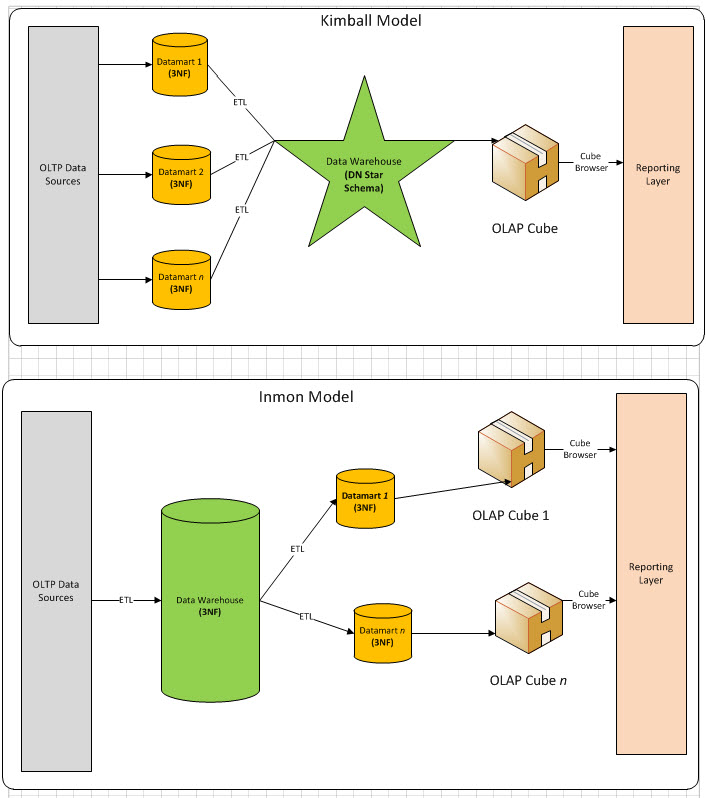
Have recently seen various folks whiteboarding approaches to data warehouse (enterprise data, data stores, ods, etc.) One thing I’m noticing is that they generally fit one or both of the historically accepted approaches, those proffered by Ralph Kimball (and group) and from the writings of Bill Inmon.
Here’s a comparison diagram I have referenced many times over the years. The diagram, and article, is from 2010, but the original thought dates back to the 1990’s or earlier.
https://bennyaustin.files.wordpress.com/2010/05/kimball-vs-inmon4.jpg
https://bennyaustin.wordpress.com/2010/05/02/kimball-and-inmon-dw-models/
Take them for what they’re worth and for the era they come from. Inmon’s model contains what looks like the current buzzword of ‘data lake’ (though Gartner and others are skeptical of the approach) In all practicality, the only OLAP cubes developed today against a star schema layer. Agile tools like PowerPivot and Tableau bypass this somewhat, but still contain a step where one models groupings (i.e. dims) and aggregate (i.e. facts)
Sunday, January 31, 2016
Prep notes for my upcoming talk on 'Partially Contained Databases'
Did a prep session
this past Friday for my upcoming talk
(Feb. 3) on 'Partially Contained Databases' to the Sacramento SQL Server Users
Group (@SacSQLUG) (Some #spoileralerts
if any the group is reading this before the Feb meeting) Had a few great, gracious current or former
co-workers view the talk and demo over a remote screen sharing session and
provide feedback.
- The feedback from a group of people with differing experiences with SQL Server was hugely valuable. As a presenter, you are so close to the topic, you can include things as obvious that you forgot actually took you quite a few leaps to discover yourself.
- The call to action, which I will add to the slides, is to 'try it out'. Try using partial containment for a simple example like a reporting service account that should have access to only one database.
- This topic is fast becoming a standard practice to employ for high availability/disaster recovery scenarios. (At this time, I'll leave it to the viewer's great mental ability to make the connection)
Some of the core
feedback (which may only make sense when the final presentation is shared)
- hard time following the difference between types of accounts
- too much time spent on the 'intro'; that is the demonstration of backup/restore in an uncontained database to demo the problem trying to be solved
- appreciated mention of the connection to certification exams
- pre-requisites of DBA knowledge
My thought process incorporating this feedback:
- Simplified the login and user creation in the demo. Namely, removed the example using Windows authentication
- Removed a time-consuming section on various permutations of recovering logins where the password is known/not known, original server is available/unavailable. This content is saved for a future blog post.
- Pre-requisites: well, I think it's OK to make an assumption or two since the talk is aimed to the SQL Server user group. And in any case, that ship has sailed for this week's talk. I may review the abstract for future use and make sure it calls out the viewer is familiar with database backup/restore.
Hurts my heart a bit
to give up the Windows auth and login recovery content, because the content is
a good practice. But the time they eat
up distracts from the two key takeaways:
- With a partially contained database, logins can live with the schema of a user database rather than the system database (that's a clue for the High Availability/Disaster Recovery connection)
- The db_owner and other database roles have additional power within a user database.
Fun stuff. and i think if i just script out the sample database creation step, all the scripts could be published to let others run the demo themselves.
Friday, January 29, 2016
Musings on Data Warehouse projects- dealing with data sources of varying quality
Had a discussion
this past week with some great colleagues re: the quality of the database
design of a potential source system (or lack thereof, depending on point of
view) I've racked my brain trying to
find an article that provided some caution in dealing with this. Almost sure it came from either a book or
article from the Kimball Group. I will
paraphrase it:
From
time to time, a data source will appear to warrant improvement of some
kind. The data source provider may be all for it. Couldn't that
spreadsheet be turned into a proper system?
Avoid
such efforts. Your team will be constantly distracted by work of a very
different cadence than that which data warehousing requires.
The closest I could
find was a snippet in “The Microsoft Data Warehouse Toolkit”, from the chapter
on Business
Requirements Example: Adventure Works Cycles (emphasis mine)
"….price
lists and international support are important issues to his organization, but
they are transaction system problems because they involve enhancing transaction
systems or building new IT infrastructure. You
can help with better reporting, but you shouldn't be dealing with connectivity
and data capture issues if you can avoid it. "
I have taken this
viewpoint into many battles over scope of a data warehouse project… I have not won all of those battles ;) Nonetheless, it’s a positive outcome to have
this caution incorporated into your mindset when evaluating sources. When possible move the system development
'out' to the proper parties as quickly as possible.
Wednesday, October 28, 2015
Oracle's SQL Developer (11gR2) Date display issue
Oracle’s SQL
Developer (as shipped with 11gR2) has a bug
feature that by default, causes only the date portion of datetime columns to
show in the displayed query results.
Here’s the default
|
And here it is set
to the ISO 8601-style date
YYYY-MM-DD
HH24:MI:SS
|

|
 |
Good luck!
Friday, June 19, 2015
Generate a Remote Desktop Connection Manager config file from SQL Server Central Management Server
If you are a SQL Server database administrator (DBA) who also has need to administer servers via Remote Desktop, this script will be of tremendous help to you at least once, and may be something you run regularly.
This script will query your SQL Server Central Management Server (not using it yet? - check out Easily Manage your SQL Server with CMS and PBM Webcast) and generate the contents of a a config file for Microsoft's Remote Desktop Connection Manager. All free tools or built into your SQL Servers.
Get the script at:
Prerequisites:
Install Remote Desktop Connection Manager (RDCMan) version 2.7 from https://www.microsoft.com/en-us/download/details.aspx?id=44989
Have populated a SQL Server Central Management Server (CMS) with at least one group and server
To use, run the script against the instance holding your CMS data.

Click on the link to the XML. Select All and Copy:

Create a new text file with the extension *.rdg (for example MyCMSServers.rdg) Paste the XML content:

In Remote Desktop Connection Manager, File->Open the *.rdg file

Details:
All unique host names are placed under a group called '_All Servers'. The 'Smart Lists' dynamically filter based on the groups in your SQL CMS. This is done by placing a comment in the RDCMan node for each server.
The script doesn't yet generate hierarchical groups in RDCMan. Keep an eye out for edge cases that I haven't tested yet: special characters in the server or group names, hosts that are found in more than one group, etc.
Get the script at:
Hope you enjoy!
Wednesday, May 28, 2014
An approach to SQL Server Rough Tuning
Looking for a way to address SQL Server database performance in a production, virtualized environment? There are many sources of expert advice from very smart people in the SQL Server world. But often the most well-thought, well-intentioned advice is not easily or quickly implemented in a complex organization. The reasons could be technical, political or simply availability of time and people.
This diagram is my current approach to "rough" tuning a SQL Server: The idea that a server administrator or database administrator (DBA) can turn various knobs and flip switches to assigned scarce resources to a database server, but as a practical matter, the inner workings of a given application and database may not be changed… or at least not changed quickly.

Example situations:
- A third party vendor application with a proprietary schema, the application might have updates, but there are dependencies or license costs that take time.
- An internal application has received an influx of new activity, but the development team is fully off on another high-priority project
- A legacy application with original developers long gone; no known test environment to experiment
Method
Took some best practices, including some selections from the guidance on the SQL Server perfmon counters of interest poster available from Dell/Quest, and added some of the basic steps available to Server administrators and Database Administrators.
Document available as a PDF
Subscribe to:
Posts (Atom)